


Generating a Better Life with LLMs
- Written by John
- Oct 10th, 2025
LLMs or Large Language Models are powerful tools for generating and boosting productivity in your daily life. With enough context, you’re able to learn new things, increase your existing knowledge, create running plans or create code for your website. These are a few things that LLMs can do.
LLMs should be used in an assistive manner and not thought of as a means of replacing your current tooling or processes. Utilise them in short-running sessions; with this, I mean don’t interact with an LLM for hours and hours with 100 prompts, as the quality of the responses will be poor. With this approach, you’ll find LLMs can get you 80-90% of the way there with your tasks, leaving the last 10-20% for you to complete.
Context, context context!
If you don’t know who I am, here’s a bit of context (pun intended) as to who I am. I’m a Google Cloud Consultant/Engineer, mainly working with cloud infrastructure, like VMs (Virtual Machines), networking and infrastructure migrations. I have previously been a “Scrum Master”, deeply integrated within a frontend and backend software development team. As a result, I understand code and can write some; hence, this website exists. I’ve been utilising models like Claude Sonnet 4.0/4.5 and Gemini 2.5 Pro. ChatGPT 5 and other models should be just as good at achieving the goals as described in this article.
To get the most out of LLMs, you need to provide context, as much context as you possibly can, without writing an essay. Construct short, direct sentences. It is a bit of an oxymoron, as you need to provide as much context as possible for LLMs, whilst constructing short sentences. When working with LLMs, you need to write with an active voice, not a passive voice (as if you’re talking to someone). Here are a couple of examples.
Do…
I’d like to implement an image gallery into this website to centralise images. The gallery should use the
/gallerypath.
Don’t…
For my website, I’d like to implement an image gallery to store images in one place. The purpose of this is to allow users to easily view images in a centralised manner. The image gallery should be using the
/gallerypath in the URL.
Do…
You should split the context into 2 or 3 prompts for larger items like a training plan.
I am a runner and I need a new running plan for a 10k race that will take place on 30th November 2025. My current 5k time is 25:00 (MM:SS). Here is my bio and history.
Provide a list of bullets for who you are, including your history.
In the second prompt, you can provide screenshots of your current running volume (km/mi per week) and a PDF or a document of a previous plan. You can also include your current running abilities (how far your long runs are).
In the third prompt, you can provide details of the plan, like how you’d like your training plan to be structured, and ask the LLM to create a plan. Ensure you describe how you’d like your plan to look (the 4 phases of a running plan) and the goal of the race.
Don’t…
I am a runner, and I need a new running plan for my 10k that will take place in 10 weeks. My current 5k time is 25 minutes. Can you come up with a training plan to allow me to run sub-50 minutes?
Admittedly, this second example is quite extreme as you’ll need to provide a lot of context to allow the LLM to understand your current training volume (km/mi per week), a bit of your running history, including injuries and when they occurred, and context for how you want your plan to be structured (a couple of weeks to build up your training, running improvement, taper and recovery).
How can I use an LLM?
LLMs are suited for a variety of applications. You can use them to assist you in creating features or fixes in software development, document your codebase, create a training plan or help you to learn.
Google’s Gemini guided learning
The ‘Guided Learning’ functionality within Gemini’s UI is a great way to assist you in learning new skills or upgrading your existing knowledge. It does this by creating an interactive experience, prompting you to input your current and new understanding of the topic you are learning.
There are a few problems with this method. From my experience, using the 2.5 Pro model, if you’re learning a new topic, you may become lost when the model asks you questions. It has happened to me quite a few times on technical topics, and I’ve had to provide input for the model to get me back on track; you do this by providing your thoughts on where you are lost or stuck and what you don’t understand. Such an input will provide enough context to allow the model to prompt you with additional questions to get you back on track with your learning.
Despite the minor issues with the model, this is a great way to learn topics, especially if they are highly technical.
Creating running plans
One thing that LLMs can do is to create training plans. As I run frequently, I will focus on a training plan for running. Although I haven’t tested it, I’m sure training plans for other sports can be created, provided you include enough context. A great video by Wild Rapha showcases this with ChatGPT 5.
When creating a large item, like a training plan, it should be completed across 2 or 3 prompts. It is to allow the LLM to digest your inputs, providing a higher-quality plan. When inputting multiple prompts, think about how to structure your prompts. Thinking about this logically, you’ll need to include:
- Details about you and your history, including your age, current running ability and any existing or prior injuries. Also include a high-level goal to allow the LLM to understand why you are doing this (you might say I want to run a 10k race on x date).
- Details about your current running mileage and plans. Include written details about this, including your current max long run distance, and provide screenshots of your weekly mileage. You can also upload a previous running plan, such as a PDF document.
- What you need and want to get out of the training plan. For example, you want a training plan to have a 4-phase structure (build up, improvement, taper and recovery). You might also want to include a goal finishing time.
Once you have your training plan, you can prompt the LLM to modify the plan. You can include one or two strength and conditioning workouts a week, or incorporate pilates or yoga into your training plan. And you can continue to iterate on your plan until you are happy with it.
Using LLMs for coding purposes
In my current role, I use LLMs to complete tasks faster. LLMs can get you 80-90% of the way there, speeding up your development or task cycle. Even if you’re allergic to LLMs, you should consider their usage for activities like documentation.
Let’s look at a few examples.
Creating sequencing diagrams from HLDs
The first thing that comes to mind is Ugh…! Creating sequencing diagrams manually is tedious. However, LLMs are great for quickly creating sequencing diagrams where you may only need to input 10-20 minutes’ worth of your time to check the initial output and to update the diagram. How can we achieve this?
Firstly, you’ll need a solution diagram. You can have an HLD (high-level diagram) of your solution where you have numbered connections; numbering the connections provides context for the LLM and allows it to understand how different components of your solution interact.
Secondly, you can construct your prompt, which may look like this.
Can you create a sequencing diagram based on the provided solution diagram? Output the sequencing diagram in Mermaid JS.
I like sequencing diagrams being output to Mermaid JS. You can commit this to Git, view the output in the Mermaid Editor and generate an image of the diagram to add to documentation.
Let’s put all of this together.
We’ll use the HLD from the Using Google Cloud To Make My Website Faster article. If we create a new prompt in your favourite LLM, ensuring you upload the HLD, you will receive a fairly well constructed sequencing diagram.

Here are the results from different LLMs (used the website for each LLM).
Gemini Pro 2.5
sequenceDiagram
    participant User
    participant CLB as Cloud Load Balancer
    participant CDN as Cloud CDN
    participant CR as Cloud Run

    User->>CLB: 1. Makes request for an asset
    CLB->>CDN: 2a. Check for cached asset

    alt Asset is cached (Cache Hit)
        CDN-->>CLB: Returns cached asset
        CLB-->>User: Delivers asset from CDN
    else Asset is not cached (Cache Miss)
        CDN-->>CLB: Asset not found
        CLB->>CR: 2b. Request asset from origin
        CR-->>CLB: Returns asset
        CLB->>CDN: Cache the new asset
        note right of CDN: Asset is now cached
        CLB-->>User: Delivers asset from Cloud Run
    end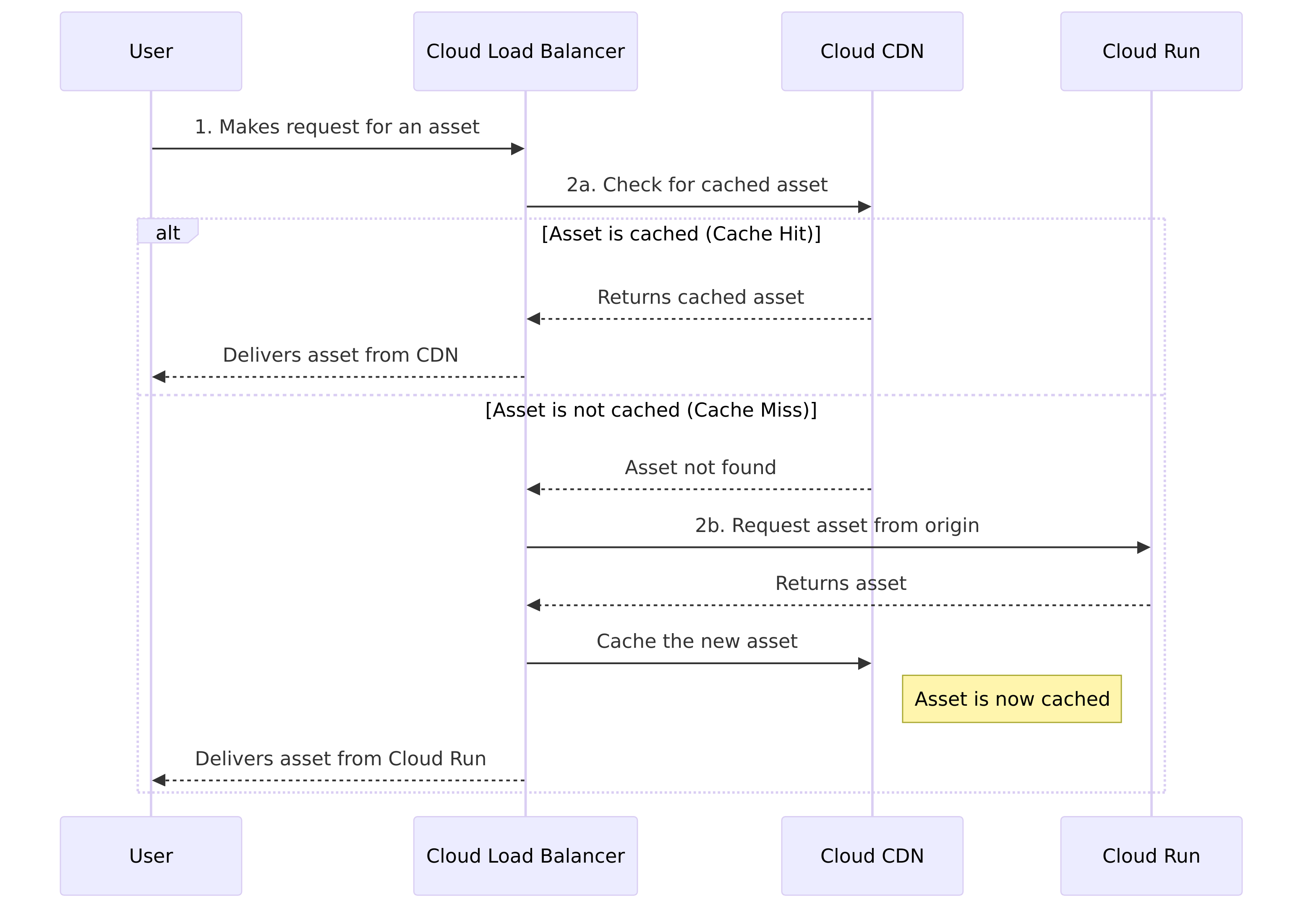
Gemini 2.5 Flash
sequenceDiagram
    participant User
    participant Cloud_CDN as Cloud CDN
    participant Cloud_Load_Balancer as Cloud Load Balancer
    participant Cloud_Run as Cloud Run

    User->>Cloud_Load_Balancer: Makes request
    activate Cloud_Load_Balancer
    alt Assets are cached in CDN
        Cloud_Load_Balancer-->>Cloud_CDN: Request assets
        Cloud_CDN-->>User: Receive assets (2a)
    else Assets are not cached in CDN
        Cloud_Load_Balancer->>Cloud_Run: Request assets
        activate Cloud_Run
        Cloud_Run-->>Cloud_Load_Balancer: Assets retrieved
        deactivate Cloud_Run
        Cloud_Load_Balancer->>Cloud_CDN: Cache assets
        Cloud_CDN-->>User: Receive assets and cached (2b)
    end
    deactivate Cloud_Load_Balancer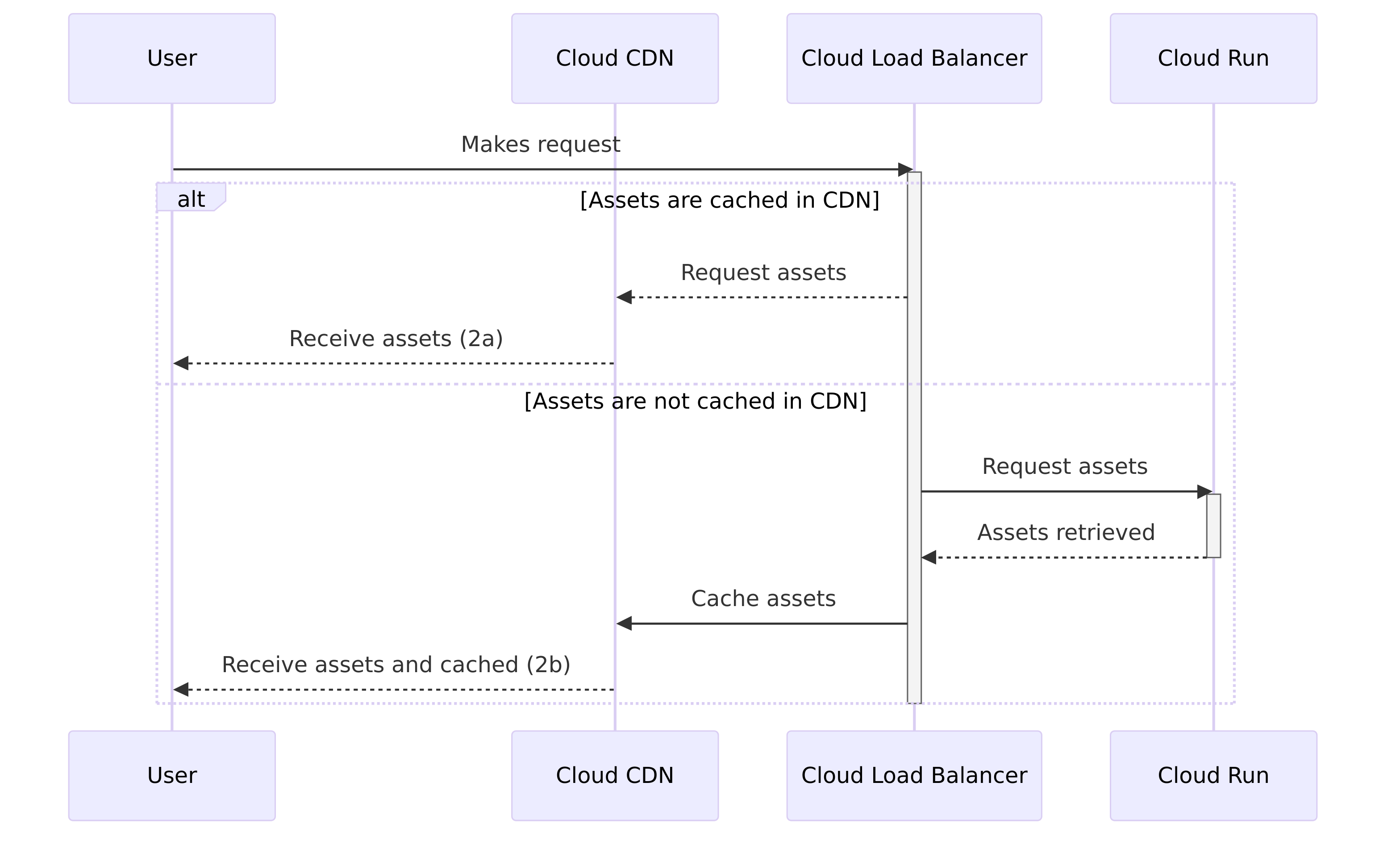
ChatGPT 5
sequenceDiagram
    participant User
    participant LoadBalancer as Cloud Load Balancer
    participant CDN as Cloud CDN
    participant CloudRun as Cloud Run

    User->>LoadBalancer: Makes request
    LoadBalancer->>CDN: Check if asset is cached
    alt Asset cached in CDN
        CDN-->>User: Return cached asset
    else Asset not cached in CDN
        LoadBalancer->>CloudRun: Retrieve asset
        CloudRun-->>LoadBalancer: Return asset
        LoadBalancer-->>CDN: Cache asset
        CDN-->>User: Deliver asset
    end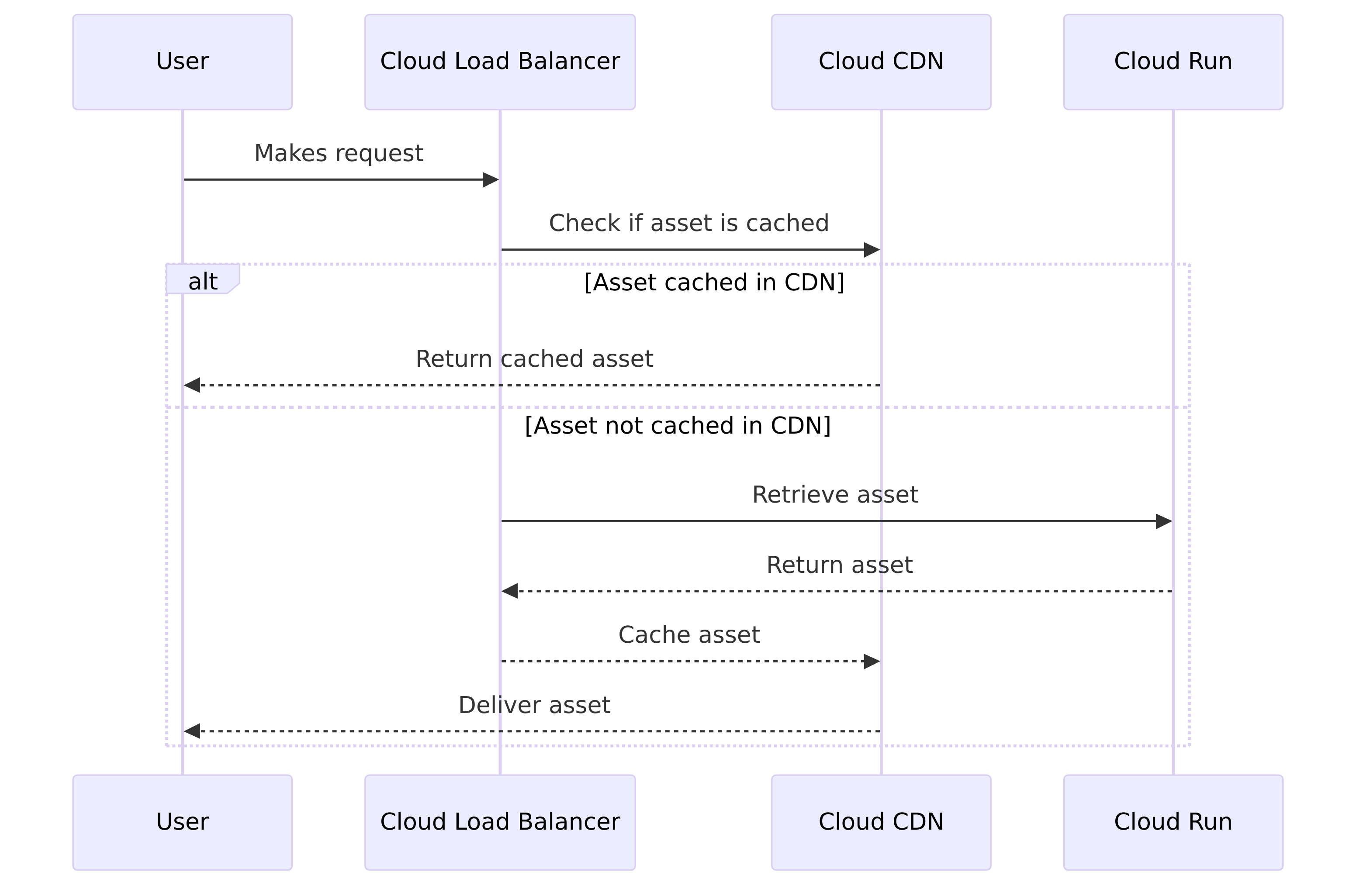
Claude Sonnet 4.5
sequenceDiagram
    participant User
    participant CDN as Cloud CDN
    participant LB as Cloud Load Balancer
    participant CR as Cloud Run

    Note over User,CR: Scenario 2a: Assets Cached in CDN
    User->>LB: 1. User makes request
    LB->>CDN: 2. Load Balancer checks CDN
    CDN->>User: 2a. Assets cached - delivered from CDN

    Note over User,CR: Scenario 2b: Assets Not Cached in CDN
    User->>LB: 1. User makes request
    LB->>CDN: 2. Load Balancer checks CDN
    CDN->>LB: Cache miss
    LB->>CR: 2b. Request assets from Cloud Run
    CR->>LB: Return assets
    LB->>CDN: Cache assets in CDN
    CDN->>User: 2b. Deliver assets to user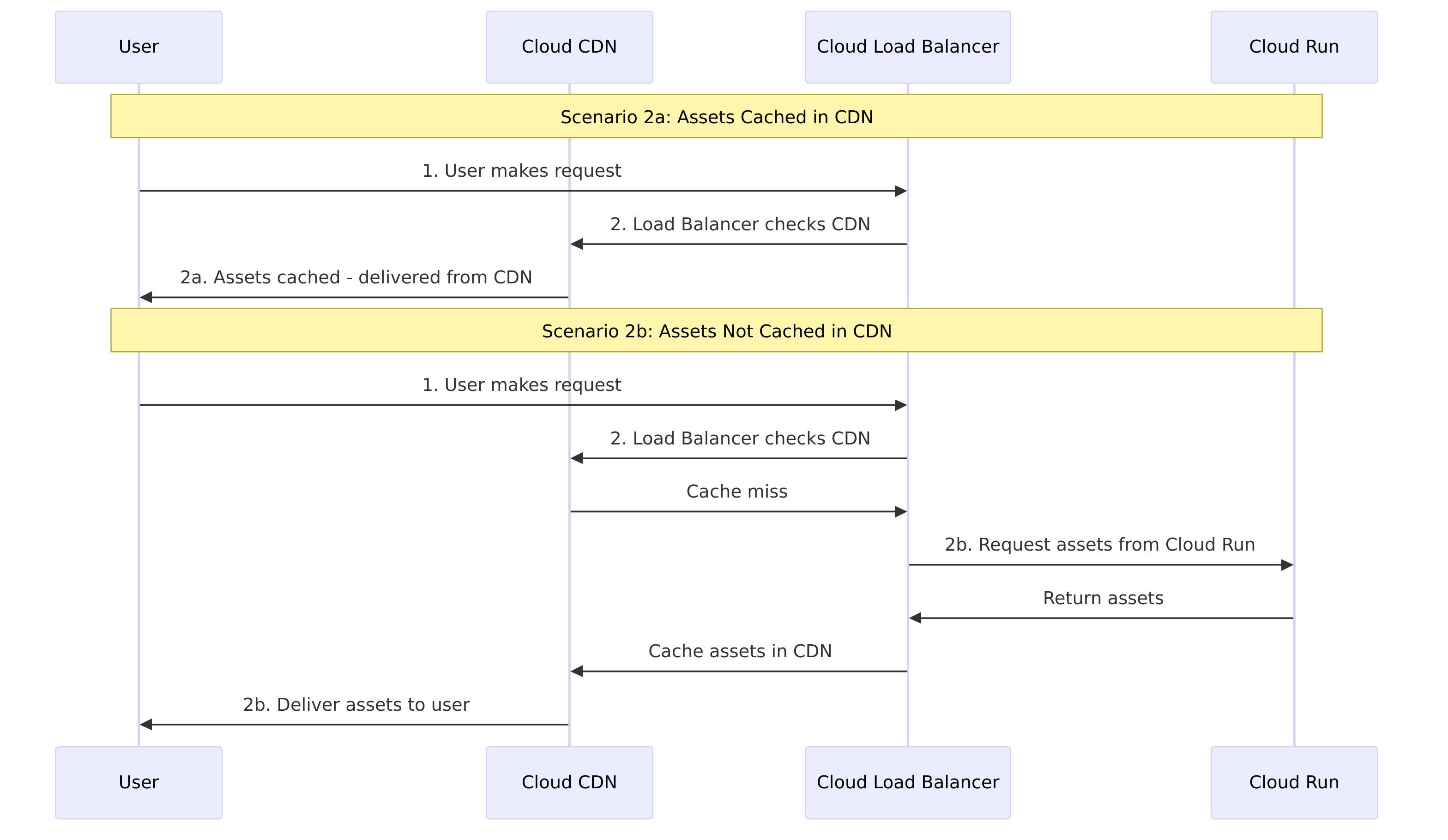
Documenting is tedious
Yes, we’ve all heard how we don’t like to document anything. If you follow Agile’s principles on documentation, you’ll understand you should have something, not nothing; write a 5 page document rather than a 100 page manual.
Again. Context. To document a codebase, you need to provide context to the LLM. For those who don’t know, this is where I introduce you to LLM CLIs. You may have heard of Gemini CLI, Claude Code or opencode. These CLIs are installed on your local machine and integrate with their relevant or configured LLM.
Because of this tightly coupled integration, when you provide a prompt such as Document this codebase, the CLI will work with the LLM, providing the source code and creating a README.md file. The LLM should be able to work out how your code functions, and perhaps it may understand where the code is deployed.
Codifying your life is addictive
As I mentioned in the previous section, you can, and you should, install LLM CLIs to improve the ability of LLMs to create and modify code. I must warn you, using the CLIs to create code can be very addictive. I find it addictive because of the semi-automated nature of how the CLIs function. They are fantastic.
However, there are downsides to codifying your life. The LLM may not provide the correct solution. But mainly, you rely on a tool that could hallucinate or create code that isn’t secure. Again, I’ll refer back to the intro where I mentioned these tools are here to assist us and not replace us.
Stop reading and go and have fun!